 GitBucket

Sunfish
A lightweight & portable web & file server in C#
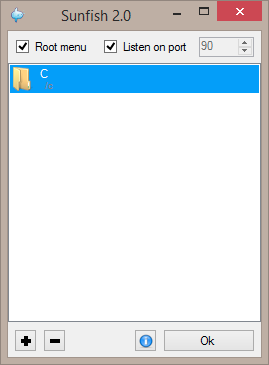 |
|---|
| Main screen |
With Sunfish you can share any folder on the computer and also static web pages.
Select the port and click "listen to port" to start the service. Remote connections will be allowed. Add a path to share and you can open this path using the computer IP.
The root menu is a small directory of available services, can be disabled, but no service can be used as root.
Editor
 |
|---|
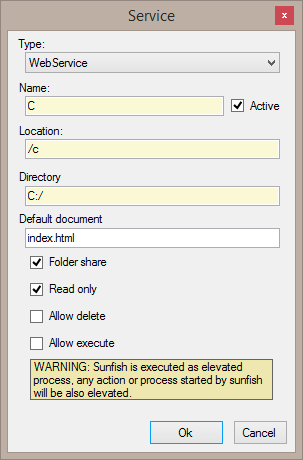
| Editor screen |
Type: Type of service, Version 2.0 only have the standard WebService but it can be added throught plugins or next versions.
Name: Name of the service, only for display, and for the root menu.
Location: Location of the service in the web path.
Directory: The filesystem directory to expose
Default document: The default index docuent.
Folder Share: Allow folder share (directory frontend), if disabled the behaviour is similar to a web share.
Read only: The shared is read only (no modifications allowed), if disabled the upload and rename of files is enabled.
Allow delete: The files can be deleted, requires non read only configuration.
Allow execute: Execute the file on the server side (See warinigs).
Plugin development
See Plugin development file
Notes
A list o available computer IPs are show on the About... button (near the OK)
| Waring |
|---|
| Sunfish uses the C# web server implementation, and this implementation requires elevated user to allow remote computers connections, will be dropped on next versions |